
Four Steps to Simplifying the RFP Response Process
How small growth teams can leverage the power of a content library


Working on a growth team for a small business can be a daunting task. While winning a proposal requires many steps, reviews, and strategy sessions, performing all those tasks will quickly stretch thin a small team. Therefore, it’s essential that these teams find ways to quickly streamline processes, reuse content, and find information easily.
As a proposal manager for a small business contractor, it is my job to make my team’s life easier in terms of content management and BD processes. To help other proposal managers and capture professionals, I’ve compiled a list of lessons learned and strategies to help streamline RFI and RFP responses. These lessons serve as an essential foundation to building up your growth team and maturing your proposal process even if you decide to streamline your approach with AI tools (hint: GovCompete helps make these steps even faster).
Step 1: Create and Maintain a Knowledge Management Structure
The first step, which may be obvious to many but implemented by few, is establishing a knowledge management structure. Whether it’s on Teams, SharePoint, Google Drive, Box, or any other system, your team needs a central location for all your documentation and pre-written content. Although each company will have their own folder structure and permissions, I recommend the following:
Proposals/RFI Responses - Organize by year/order of the responses. This way they are easier to find later, and there are fewer clicks into the folder structure to find a particular proposal
Past Performances - Create a folder for each project so you can store SME interviews, past performance write-ups from proposals, your master write-up, key graphics, and any other content you find relevant to the project
Marketing Briefs - Maintain master brief and then separate folders for presentations and slicks you provide to each customer so you can see how they are modified for them
Pre-Written Content - Separate this by “Technical,” “Non-Technical,” and “General Company Information.” I also recommend storing only your best, unique content. If you add in too much redundant information, you just create a cyclical, “copy of a copy” issue
With these folders, you now have a one stop shop for your proposal and RFI responses that your entire team can reference. To ensure this repository is maintained properly, I recommend assigning two people to oversee it.
Step 2: Implement a Lessons Learned Cadence to Identify Strong Reusable Content
One of my favorite parts of a lessons learned session is that it kickstarts the knowledge management maintenance practice. At the end of each lessons learned session, our team identifies the most compelling content that I can extract from the proposal and add to the repository. This helps keep me accountable and also ensures I have team input on good content.
Step 3: Convert as Much Content to Templates as You Can
At this moment, I am a one-woman proposal team, so I need all the help I can get when it comes to working on a live proposal or upcoming RFI. One of the ways I can help myself is by creating comprehensive templates that give me a head start. I’ve listed out some ideas below:
RFI Templates - For RFI templates, you want to add the following:
Company Information - Important identifiers (CAGE code, UEI, address, POC info, etc.) along with a summary of company quals and history
Headings you see often (i.e. Company Information, Technical Questions, Past Experience, Capabilities Statement, etc.)
Pre-created tables for past experience
Proposal Templates - Proposal templates are less standard across the board, but there are some key items and attachments I like to have ready to go
Org Chart - Keep an editable copy in your graphics folder for each proposal.
Executive Summary layout - This should have an introductory section dedicated to discussing the customer and their needs, followed by a pre-written section about your company, then an introduction to teammates, and then finally a summary of your solution (doesn’t necessarily have to be in that order, but a pre-structured layout is useful for quick turn proposals).
Key Callout Boxes - Do you have standout metrics you like to reference in each proposal? Keep editable versions ready to go in your graphics folder so you can easily insert them.
Step 4: Plan Out Proposal Story before Writing
As someone with a writing background who also works with project professionals, I am always amazed when people create multi-page project plans and hold multiple strategy sessions for launching a new product, but believe that a written document can be written perfectly from scratch with no planning.
A proposal, like an IT project or product development, requires time, effort, and planning. When even a small team consisting of a proposal manager, capture lead, and subject matter expert sit down together for a 10 minute planning session, the results can improve dramatically.
To help start off the discussion, I suggest using a table like this:
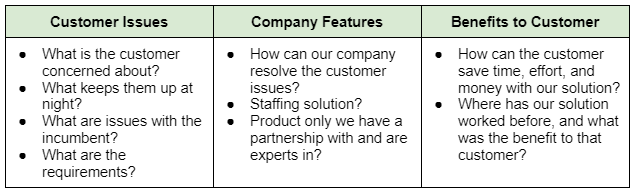
When you plan out your “story” like this, you begin to see what kind of content you need - graphics, callout boxes, customer stories, etc. - and where you can fetch that content. This brings us back to Step 1, because now you have a guide to help find your content in your beautifully organized repository.